Host workloads
Claimed by an executor process on a Mac, with "executor": "host", and driving
a device from outside over adb or simctl. Installing an APK or tapping
through a UI test is not something an app can do to itself.
The executor runs wherever the devices are physically attached. See
Deploy for where it lives and what it needs on PATH.
enrol
Tell every attached device which collector to talk to, without anybody typing an address.
The enrolment screen has always said the hard part is typing an address on a touch keyboard without a typo. A QR code answers that for a phone, because a phone has a camera. It answers nothing for a television, which has neither a camera nor a keyboard worth using, and a Roku remote has no text entry beyond an on-screen grid.
There are two ways out: the device finds the brain, or the brain reaches the device. Discovery is the first. This is the second, and it is the one that still works when multicast is blocked — which is guest wifi, most offices, and every Docker bridge network.
Each driver knows its own mechanism:
| Driver | How |
|---|---|
adb |
am start -S --es base_url <url> — the Android runner has read this since the shelf was built |
simctl |
simctl launch with SIMCTL_CHILD_FLEET_URL |
devicectl |
devicectl device process launch --payload-url fleetrunner://join?url=… |
roku |
POST /launch/dev?fleet_url=<url> over ECP |
It verifies, because all four fail silently
This is the whole reason the workload is more than a shell script. Every one of
those mechanisms reports success for a device that did not enrol: am start
exits 0 and prints Error type 3 when the package is not installed; a simctl
launch succeeds against an app that ignores its environment; an ECP launch
returns 200 for a channel that then cannot reach the address it was handed.
So a device's result row is "it registered with that collector within the
window", or the reason it did not — and the reason names which half failed,
the launch or the registration after it. Ninety seconds by default,
params.wait_s to change it.
Registration is detected by watching for a device id that was not in the
registry before. Not by name: the runner chooses its own id and nothing outside
the device can predict it — a Roku's is GetChannelClientId(), a per-publisher
value ECP does not expose. The cost is that an unrelated device registering
during the window would be credited to this enrolment, which on a shelf being
deliberately enrolled is a fair trade for a check that works at all.
A loopback address is refused
Omitting params.url uses the collector this executor claims from, which is
usually right. If that is 127.0.0.1, the job fails immediately rather than
enrolling a shelf onto an address no other device can reach — a failure that
otherwise looks like a network problem for days. Pass the LAN or tailnet
address explicitly.
Status: the launch path has never been run against a device. No Android device was attached and no simulator was booted on the machine this was written on. What is tested is every path that decides not to enrol: the loopback refusal, no targets, a driver with no mechanism, and one device's failure not stopping the others.
The Apple half is closer than that suggests: the runner reads FLEET_URL from
its launch environment and handles fleetrunner://join, and both the iOS and
tvOS apps were built and their Info.plist confirmed to register the scheme.
What has not happened is a device being launched with either.
install
One artifact onto every attached device — adb install on Android,
simctl/devicectl on iOS.
{ "schema": 1, "job_id": "install-903", "workload": "install", "executor": "host",
  "app": { "name": "your-app-android", "build": "903", "sha256": "latest" } }
"sha256": "latest" resolves to the newest build published for that app name.
That is the mechanism that stops a nightly testing a build older than the code
it guards — see Publish on merge.
With nothing attached, the job is claimed and fails cleanly with
no android targets attached, which is the correct answer rather than a hang.
upgrade-test
Does the version users already have survive becoming this one? Almost no app project automates this, and it is the failure that actually loses people. A clean install passes every suite in the fleet; the path nobody runs is a real user with two years of data taking an update and the migration dropping a table.
{ "schema": 1, "job_id": "upg-1", "workload": "upgrade-test", "executor": "host",
  "app": { "name": "app-android", "build": "latest", "sha256": "latest" },
  "params": { "from_sha256": "<the build users have>",
              "seed_flow": "seed-account", "verify_flow": "account-survived",
              "app_id": "com.example.app" } }
Five steps: install the old build, seed it with a flow, install the new build
over it, launch, verify. Step three is the one that has to be right —
adb install -r and simctl both upgrade in place and keep the sandbox, and an
uninstall between the two would make this an install test with extra steps that
passes forever.
The stage is on every row and is the point of the row. A failure at
install-old or seed is the old build's problem and says nothing about the
upgrade; at upgrade it is packaging, a signature mismatch or a downgraded
versionCode; at launch it is a migration that crashes on start; at verify it
upgraded, it launched, and the data is wrong. "upgrade-test failed" without the
stage sends somebody to read the wrong logs.
from_build must already be resolved to a hash. The executor deliberately does
not resolve build names — the collector owns publish ordering, and a workload
guessing which artifact "1.4.0" meant could pick a different one than the
dashboard shows.
size-report
The cheapest workload here. No device, no install, no toolchain: it fetches an
artifact a build job published and reads its zip central directory. So it can
run on every push forever, and the value is the trend — a graph of download size
per build answers "when did this get big" months later, which nobody can answer
retrospectively without having measured all along.
{ "schema": 1, "job_id": "size-1", "workload": "size-report", "executor": "host",
  "app": { "name": "app-android", "build": "latest", "sha256": "latest" } }
Three numbers, because one misleads:
| Metric | What it is |
|---|---|
artifact_bytes |
the archive: what CI publishes and the store holds |
download_bytes |
the sum of compressed entries: roughly what a user waits for |
installed_bytes |
everything unpacked: roughly what it occupies on the device |
They differ by a lot — native libraries compress well and resources do not — and quoting one when somebody meant another is the usual way a size report misleads.
Native libraries group per ABI rather than as one lib/. lib/ being huge
tells you nothing you did not know; lib/arm64-v8a being 18 MB of it tells you
what to split.
ui-test
Maestro flows or an XCUITest bundle, per device, with the JUnit report parsed back into results and uploaded as an artifact.
{ "workload": "ui-test", "executor": "host",
  "app": { "name": "your-app-android", "build": "903", "sha256": "latest" },
  "suite": { "kind": "maestro", "flows": "your-app/smoke.yaml" },
  "targets": { "exclusive": true },
  "lease": { "ttl_s": 1200 } }
Flows resolve relative to flows/ (FLEET_FLOWS_DIR to change). exclusive
takes a device lock for the run, because two suites tapping the same phone is
not a test.
iOS UI tests need a Mac with full Xcode. simctl and devicectl ship with
Xcode, not the Command Line Tools, so they run on a different executor from the
Android work. The iOS executor covers standing one
up.
cold-start
Launch the installed build from cold, warm and hot; p50 and p95 per state, per device.
Metrics: launch_ms, launch_state.
Cold-start on iOS is not offered: simctl returns at process spawn rather than
at first frame, so the number would measure the wrong thing.
app-soak
Memory, jank and crashes over hours.
Metrics: pss_mb, jank_pct, crashes, app_state.
No PSS on an iOS simulator — only host RSS is available there, which counts shared pages Android's PSS does not, so the two are not the same quantity and the workload says so rather than reporting one as the other.
a11y-audit
The accessibility tree diffed against a baseline, at the largest dynamic type.
Bold text below Android 12 is refused: the setting writes and nothing reads it, so a pass would prove nothing.
locale-shots
A screenshot flow under every locale, including RTL, bundled as a store-ready contact sheet.
Metrics: locales, shots.
The check that catches a green run that measured nothing
It fails a device when two locales produce byte-identical screenshots. An app whose locale setting never reached it is otherwise indistinguishable from a correct run: the setting reads back fine, every folder exists, and every folder is in English.
Locale is not settable on a physical iPhone, and the workload refuses rather than pretending.
web-test
Playwright suites from web-specs/ against targets.url, one result row per
config project. Needs an executor started with FLEET_WEB=1.
params.browser picks the projects: one name, an array run in sequence, or
"all" for everything in playwright.config.ts. The executor beacons between
projects, so the lease budgets one project rather than the whole matrix.
web-shots
The capture half of visual regression. Reads web-specs/<site>/shots.json —
pages with optional waitFor, mask selectors, fullPage and settle_ms,
plus the profiles to capture under — screenshots every page × profile, and
uploads the PNGs.
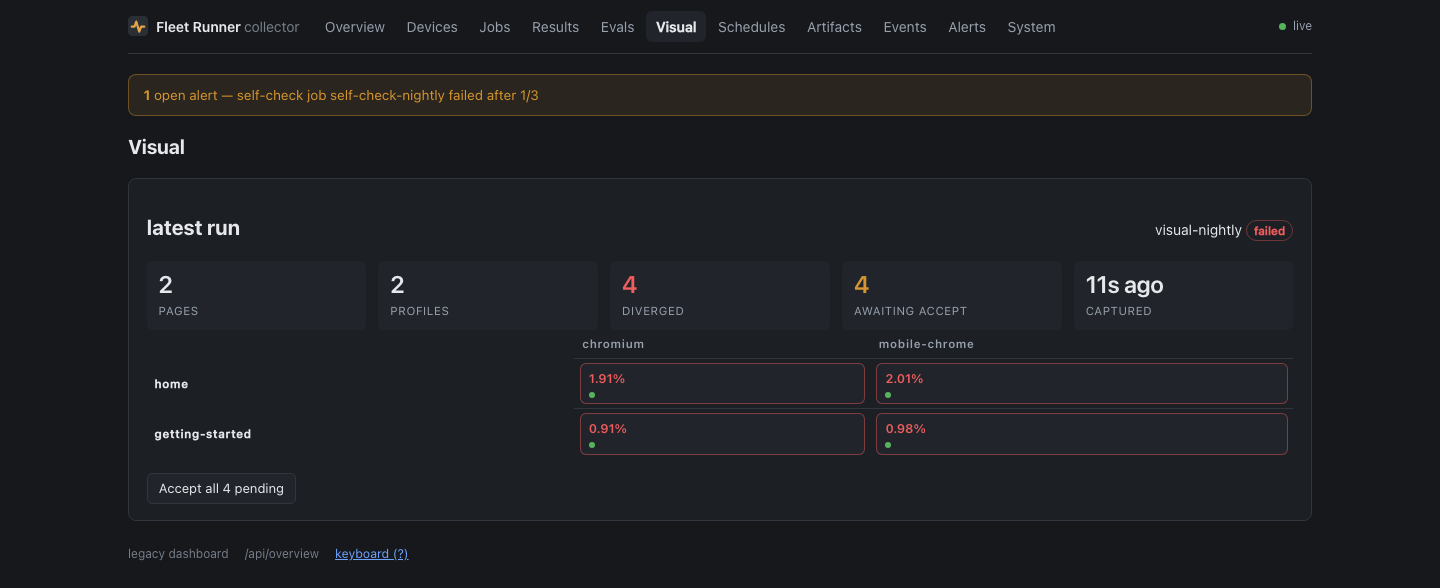
Each capture is diffed with pixelmatch on the executor, because baselines
are only comparable to pixels rendered by the same host. A page over its
threshold_pct (default 0.1%) fails with diff_pct and a diff-image artifact.
A page with no baseline passes with a "new: no baseline" note until somebody
accepts a shot.
Real phone screens
Two profile names expand to real hardware attached to the claiming executor, one profile and one baseline per device, because two phones have two screens:
| Meta-name | Becomes | How |
|---|---|---|
android-device |
android:<serial> per Android device |
Real Chrome driven via Playwright over adb |
ios-sim-safari |
ios-sim:<name> per booted simulator |
Safari via simctl openurl, status bar pinned to 9:41 |
A meta-name that finds no hardware fails its slot rather than quietly shrinking the matrix. Pin device captures to the executor whose shelf holds the devices.
Real-iPhone Safari has no capture path; a WKWebView inside the runner app
covers it instead, and the profile is named webkit rather than safari
because a WKWebView has no reader mode and no content blockers, and somebody
reading "safari" in a baseline matrix would believe a stronger claim than the
capture supports.
web-audit
Crawls targets.url with a real browser and audits every rendered page: titles,
descriptions, canonicals and their site-wide duplicates, h1s, JSON-LD validity,
redirect chains, broken internal links with who links them, bounded
external-link checks, sitemap-versus-crawl diff, robots.txt sanity. Then
re-renders each page under a phone profile for viewport meta, content overflow,
tiny text and tap targets.
A real browser rather than fetch, because these are single-page apps and
fetch would bless a blank body.
Metrics: pages_crawled, issues_error, issues_warn. Error-severity
findings fail the run; warnings land in the report artifact.
web-unfurl
Fetches the raw HTML the way link-preview bots do — no JavaScript — under several bot user-agents, and validates og and twitter tags plus the og:image itself.
This exists because Open Graph tags injected client-side unfurl as nothing on every platform, and a browser-based check can never see that bug. It needs the raw HTML, which is the opposite of what the rest of the web auditing does.
drain
Battery curve under a replayed GPX track.
Metrics: drain_pct_per_h, plus the per-sample curve.
Long-running, so the lease TTL defaults to 14400 s. Pairs with the smart-plug energy support to unplug a pool before a run.
soak
Whether a runner is still alive hours later — the per-check process-alive timeline per device.
archive
Pulls data the vendor will eventually delete, into the artifact store, where it is kept forever.
source: "gsc"— one finalized day of Search Console data. Google keeps 16 months.source: "asc"— App Store Connect reviews, via an ES256 API key.source: "play"— Play Console reviews.
Play returns roughly the last seven days of reviews and nothing older, so the review pulls must run daily. A lazy cadence loses data permanently.
Credentials are Keychain items on the executor host. The job spec names the
account only, never the secret — POST /jobs is unauthenticated, so a spec is
not a place a credential could safely live. Until the Keychain item exists the
job fails with instructions rather than silently producing nothing.
digest
The weekly payoff, and the fleet eating its own cooking.
The executor gathers the week's archived reviews, dedupes by review id against
the previous digest's watermark, and farms the LLM work to the shelf as
ordinary batch jobs: one pass classifying every review against a fixed topic
taxonomy, deterministic clustering in code between the passes, one pass
summarising each cluster. Then it assembles a markdown digest with real quotes
chosen in code, never generated.
Devices are matched with ram_mb >= 4000 and require_charging, and the job's
model names the GGUF the shelf runs.