Get started
At the end of this page you have a real result row from a real job in a real database, with a dashboard in front of it. Most of it is one command.
You need Node 22.13 or newer, and nothing else. No Xcode, no Android NDK, no phone, no device on your desk. The first device on your fleet is the machine you are typing on -- which is a fleet device in its own right, not a stand-in for one, and it reports through exactly the same protocol a phone does.
Phones, televisions and browsers come next, once you have seen the loop work.
1. Get fleet
No release has been published yet, so that line does not work
There are no tags and no archives, so the installer asks GitHub for the latest release, finds nothing, and stops. Build from a checkout instead:
git clone https://github.com/addisdev/fleet-runner
cd fleet-runner
npm --prefix collector install
npm --prefix runner-machine install
npm --prefix fleet install
npm --prefix collector run dash:install && npm --prefix collector run dash:build
node fleet/build.mjs
fleet is then node fleet/dist/bin/fleet.mjs. Put fleet/dist/bin on your
PATH, or type the whole thing -- the rest of this page says fleet either
way.
Install has the same thing per platform, and is honest about which of them anyone has actually run. macOS/arm64 is the answer.
2. fleet up
fleet 0.5.0-dev
  home     /Users/you/.fleet
  roles    brain, agent
  brain    http://127.0.0.1:8788  (bind 0.0.0.0)
  agent    -> http://127.0.0.1:8788

19:22:41  brain: start pid 76003
19:22:41  agent: start pid 76004
That is the whole fleet: a collector (the brain -- registry, queue, results,
dashboard) and a machine agent (this laptop, as a device), each in its own
process, both supervised. No configuration file to write, no broker, no cloud
service. Everything it keeps goes in ~/.fleet.
Both roles by default, because the first machine this exists for is a brain and
a runner at once. --role brain or --role agent for one of them,
--role brain,agent,executor to add the host executor that drives phones over
adb and simctl.
Why a supervisor at all, when launchd and systemd exist
They do the easy nine tenths. The tenth is that KeepAlive restarts a
process that crashes on startup every ten seconds forever -- a collector
with a bad bind address, an agent pointed at a brain that is not there --
writing a stack trace into a log file nobody rotates. From outside, that is
indistinguishable from a fleet that works.
So fleet up backs off, rotates, and after five failures in quick
succession stops and says which log to read. A child that ran for a
while and then died resets the counter, because that is a component that hit
something rather than one that was never going to start.
launchd still supervises the supervisor. See deploy.
3. Check it
One device online is this machine. The hexadecimal is the brain's id, from
~/.fleet/data/collector.json; it survives a restart, and it is never
overridable, because an id somebody can set is an id two brains can collide on.
FLEET_NAME overrides the name for the life of the process -- worth knowing,
because two collectors on one machine otherwise both take the default from the
same hostname and are both called MacBookPro.
The same facts over HTTP:
{ "ok": true, "collector": "81fcc8c99b4559f4", "name": "MacBookPro",
  "instance": "76003-1788753978679", "started_at": "2026-09-07T04:06:18.679Z",
  "uptime_s": 23, "now": "2026-09-07T04:06:42.556Z", "node": "v26.5.0",
  "pid": 76003, "stream_clients": 0, "guard": false }
collector and instance are not the same thing and the difference matters:
instance changes on every restart, which is what the dashboard's live stream
needs, and collector does not, which is what a device registered with more
than one brain needs.
What the agent declared
~/.fleet/logs/agent.log:
[machine-macbookpro] fleet-runner-machine 0.5.0-dev on darwin/arm64, collector http://127.0.0.1:8788
[machine-macbookpro] registered with http://127.0.0.1:8788; capabilities: benchmark, build, build:gradle, build:xcode, build:npm, self-check, llm-eval
Read that capability list. It is not a fixed string -- the agent probed your
machine for it. build:gradle appears only if gradle resolves,
build:xcode only if xcodebuild does, benchmark:llama.cpp only if
llama-bench does. A machine with none of the optional toolchains still
declares benchmark, self-check and llm-eval, because those need nothing
installed. The collector will never offer this agent a workload that is not on
that list.
fleet doctor prints the same list with a reason beside everything missing, and
exits 0 either way -- a machine that cannot build for iOS is not a broken
machine.
The agent registers as machine-<hostname> in the pool machines. Both are
overridable with FLEET_DEVICE_ID and FLEET_POOLS.
4. Enqueue a job
curl -X POST http://127.0.0.1:8788/jobs \
  -H 'content-type: application/json' \
  -d '{
    "schema": 1,
    "job_id": "hello-fleet",
    "workload": "benchmark",
    "executor": "device",
    "backend": "synthetic",
    "params": { "prompt_tokens": 256, "gen_tokens": 64, "warmup_iters": 1, "measure_iters": 3 },
    "targets": { "pool": "machines" }
  }'
The agent is long-polling, so it claims the job within a second or two and runs it. Watch the status change:
queued → claimed → done, in a few seconds.
targets.pool has to match
The machine agent registers into machines. Ask for ml-capable -- the pool
the phones use in the examples elsewhere in these docs -- and the job sits
queued forever with nothing to explain why, because no registered device
is in it. Targeting covers the better tool:
targets.match, which is a statement about what the job needs rather than a
label somebody has to keep accurate.
5. Look at what you measured
{
  "page": 1, "per_page": 50, "total": 4, "pages": 1,
  "results": [
    {
      "job_id": "hello-fleet",
      "device_id": "machine-macbookpro",
      "iter": 0,
      "final": true,
      "ok": true,
      "metrics": {
        "load_ms": 0,
        "prefill_tok_s": 399.0,
        "decode_tok_s": 396.86,
        "ttft_ms": 643.67,
        "peak_mem_mb": 61,
        "mem_method": "max_rss",
        "thermal": ["nominal", "nominal", "nominal"],
        "battery_start_pct": 80,
        "battery_end_pct": 80,
        "synthetic_digest": "d7e8b70dfb48593edebc84967a969e78429f9ac6da8d0c681a4b57a2fe078a84",
        "synthetic_rounds": 1000
      }
    }
  ]
}
Four rows, not one. total: 4 is one row per measured iteration plus the
final summary, and only the summary has final: true -- that is the one to
read, and the per-iteration rows are what let you see a device that got slower
as it warmed up. The list is paginated (page, per_page, pages) because a
long-running job on a shelf of devices produces a great many of these.
Then open http://127.0.0.1:8788/dash and go to Results.
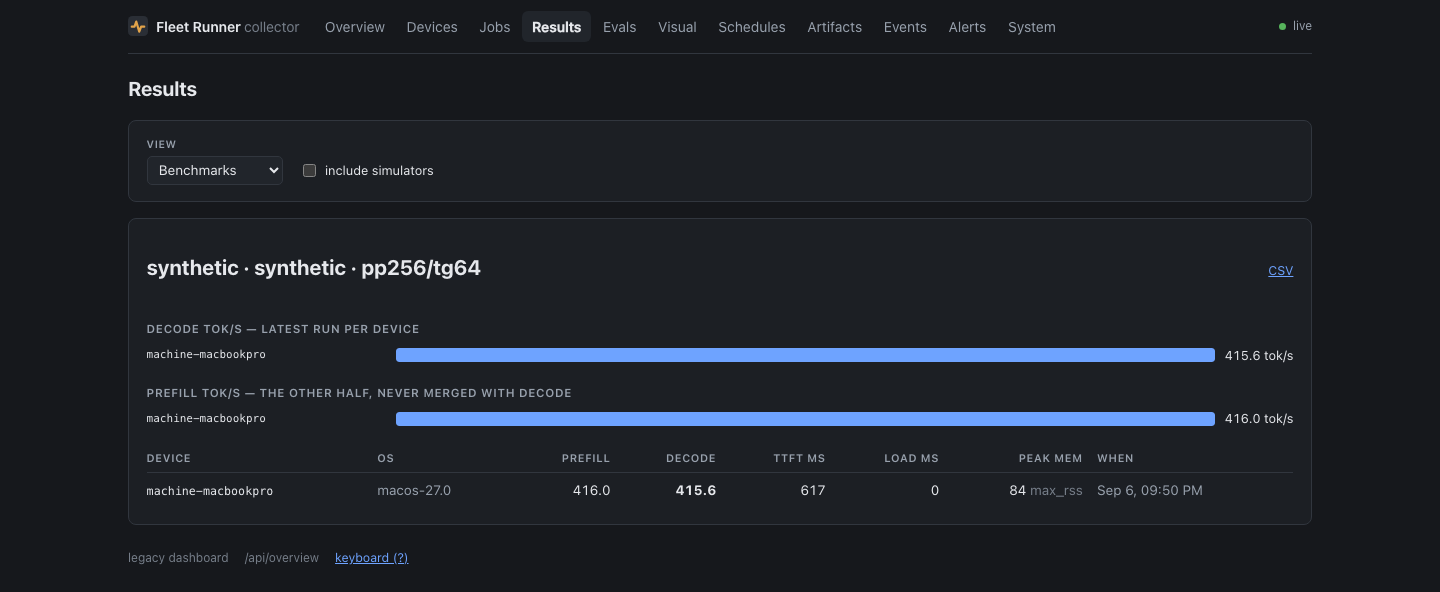
Those numbers are from an M1 Pro, and they are not LLM throughput. The
runner is careful never to present them as such: backend: "synthetic" is a
SHA-256 digest loop, sized in "tokens" so it produces a figure shaped like a
benchmark result. Its whole job is to be identical on every platform, token
for token, so a 2019 Android phone and this laptop land in the same table
comparably. Real model numbers come from backend: "llama.cpp", which needs a
model.
Four fields in there are the fleet refusing to round off:
mem_method: "max_rss"says how peak memory was measured, because RSS on macOS and PSS on Android are not the same quantity and averaging them would be nonsense.battery_start_pctandbattery_end_pctare both recorded, so a run that drained the device while measuring it is visible rather than inferred. A benchmark on a throttling device produces a number that lies, which is why constraints exist.thermalis every sample taken during the run, not an average.synthetic_digestis the proof the arithmetic was the fleet's.d7e8b70d…is the same value the browser runner, the Roku channel and the phones all report, andnpm run conformancerecomputes it from the written specification rather than from another runner's code.
Adding a device
The laptop agent proved the loop. Everything else is the same loop with a way of getting the collector's URL onto the device in front of it -- a QR code for a phone, an ECP launch parameter for a Roku, mDNS for another machine.
Adding devices covers each one. The short version:
cd runner-android
./gradlew :app:installDebug
adb reverse tcp:8788 tcp:8788   # the phone reaches your Mac over USB
Open the app, keep the default http://127.0.0.1:8788, and tap Start
agent. The same APK installs on a Fire TV, an Android TV box, a Quest and
a Wear watch -- adb connect <ip> first for the ones with no cable.
cd runner-ios
brew install xcodegen
./generate.sh
xcodebuild -project FleetRunner.xcodeproj -scheme FleetRunner \
  -destination 'platform=iOS Simulator,name=iPhone 16' -derivedDataPath build build
xcrun simctl install booted build/Build/Products/Debug-iphonesimulator/FleetRunner.app
xcrun simctl launch booted com.taylab.fleetrunner -autostart 1
A fresh clone builds with nothing else installed. What you get is the synthetic and Core ML backends; the llama.cpp workloads report that their backend is unavailable, which is the honest answer rather than a wrong number.
Open http://127.0.0.1:8788/runner. That is the whole procedure -- the page
enrols the browser that opened it. The dashboard's Enrol screen draws a QR
code pointing at it, for getting it onto a phone.
A simulator reaches 127.0.0.1 directly because it shares the Mac's network
stack. A real device needs the host's address on your network -- its .local
name, or its tailnet address if you run one.
Which of these have actually been watched to register, and which are only believed to work, is Platforms -- with an honest column, because a list of platforms a project "supports" is worth very little.
From a checkout, component by component
fleet up supervises three programs; it does not reimplement them. Each still
reads its own FLEET_* variables, still has its own entry point, and still runs
perfectly well started by hand -- which is what you want when you are changing
one of them, because npm run dev in collector/ reloads on save and a
supervised child does not.
Start the collector:
That is a working collector on http://127.0.0.1:8788 with an empty database it
creates for itself.
The dashboard needs one extra build
/dash is a Preact app with its own package.json, and its build output is
gitignored. Without it the collector serves a page telling you to run the
build, and everything else keeps working:
In a second terminal, turn your laptop into a fleet device:
[machine-your-hostname] fleet-runner-machine 0.5.0-dev on darwin/arm64, collector http://127.0.0.1:8788
[machine-your-hostname] registered with http://127.0.0.1:8788; capabilities: benchmark, build, build:npm, self-check, llm-eval
From there, steps 4 and 5 above are identical -- it is the same collector and the same agent, and the job does not know which way they were started.
The third program is the host executor, npm run executor in collector/. It
claims host jobs and drives phones from outside, so it is only interesting once
something is plugged in. Deploy covers what
it needs on PATH.
Where to go next
- Concepts -- leases, capabilities and targeting, which is what you need before writing a job spec that does something interesting.
- Workloads -- the other twenty-odd things it can run.
- Adding devices -- phones, televisions, Rokus, browsers.
- Wire in your app -- publish builds on merge and run a nightly against your own devices.
- Deploy -- keeping it up with
fleet service, and the network gotchas that cost an evening each.
Before you put it on a network
There is no authentication, by design -- anyone who can reach the collector
can enqueue a job. fleet up binds every interface and warns that it did.
FLEET_BIND (or fleet config set collector.bind) decides which networks it
answers on, and loopback plus your tailnet address is the configuration most
people want. Deploy has the detail.