Using the app
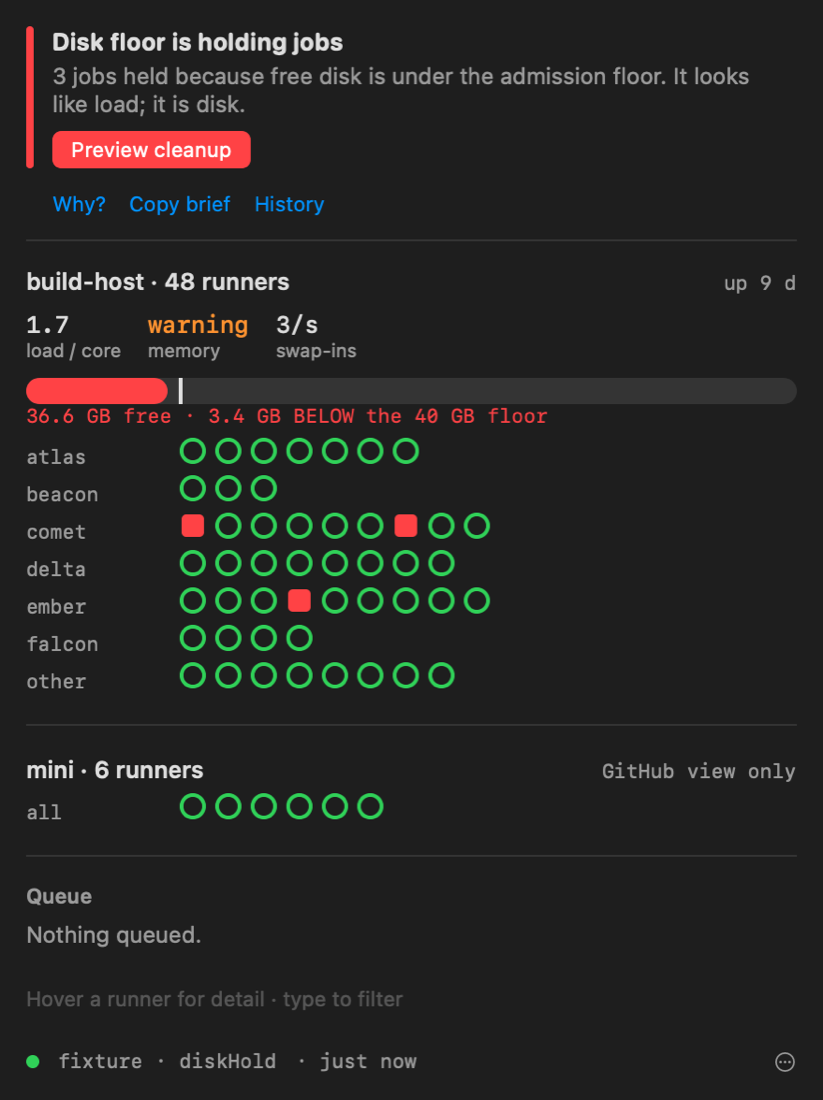
The menu bar
One mark for the verdict, and optionally the number of running (▸) and
queued (◷) jobs. The mark's shape carries the verdict, so it reads without
colour:
| Mark | Verdict |
|---|---|
| check in a circle | clear or working |
| triangle | a warning rung (saturated, account blocked, config drift) |
| octagon with a cross | a critical rung (dead service) |
| drive with an exclamation mark | the disk floor is holding jobs |
| broken bolt in a circle | the host is down |
| Wi-Fi with a slash | this Mac is offline |
| question mark | nothing can be read |
Hover it for the verdict's title and how fresh the view is.
Show running and queued counts in Settings turns the numbers off. Held jobs
are not counted as running: GitHub reports a job held by admission as
in_progress, but it is not doing any work.
The popover, top to bottom
The verdict
The verdict in words, one sentence on what it means, and one button for the next move — Preview cleanup when the disk floor is holding jobs, Health check and repair for a dead service, Open billing for an account block. Below it, everything else that is open, one line each, in ladder order.
The rungs and what opens each one are on the Verdict reference.
Host lanes
One lane per host. The coordinator comes first, with load per core, memory pressure, swap-in rate and a disk gauge that draws the admission floor on it. Runners registered on machines the dashboard does not supervise get a lane of their own marked GitHub view only: GitHub's word on them is all there is.
Runner pills
A pill per runner, grouped by project. The shape carries the state, so the grid reads the same without colour:
| Pill | State |
|---|---|
| hollow ring | idle |
| filled arc | busy; the arc is elapsed time against the workflow's usual duration |
| ring with a dot | held for an admission slot, which is normal |
| square | held by the disk floor |
| dashed ring | offline for under five minutes, which usually self-resolves |
| cross | offline for longer, or the runner service is dead |
| diamond | lost contact mid-job in the last hour |
| arrow | draining |
| question mark | misconfigured (orphan, label mismatch) |
| hatched | its host is not reporting |
| dotted | state unknown |
A busy pill whose job has run past its workflow's 95th percentile is drawn overdue. Hover a pill for its detail; click it to open the runner's panel. Compact runner dots in Settings swaps the pills for dots on a crowded fleet.
Checks
Every commit with checks still running (or finished red) as one row: "comet-web PR #96 · 2 of 5 done · done in 11m–26m". The bell on a row watches it: you get a notification when that commit's checks finish, green or red, and the failure notification says not your code when the host or the account failed them. With Play a sound when a watched commit goes green on, a green finish also plays a sound.
A cancelled check counts as not passed. GitHub cancels a job that sat past its
timeout-minutes, and an admission hold counts against that timeout, so a
"cancelled" on a busy day is often the fleet's doing.
The queue
Oldest first, with the classifier's cause in plain words and, where one can be given, when the run should start and finish: a p50–p90 range from the job ahead of it and this workflow's history. A run whose cause never clears on its own says won't start on its own instead of a number. A run in a public repository queued for GitHub-hosted runners says waiting on GitHub: that queue is GitHub's, and it clears by itself.
Failed in the last 2 hours
Red runs with the reason the daemon recorded. The ones that were the host's or the account's doing — lost runner, refused by billing, storage quota, no runner to take it — are marked not your code.
When the connection drops
The last view stays on screen, greyed, with its age. It never stays green. After 20 seconds of failed reconnects the cockpit starts checking the host out of band and says what it found; see when the dashboard does not answer.
Why?
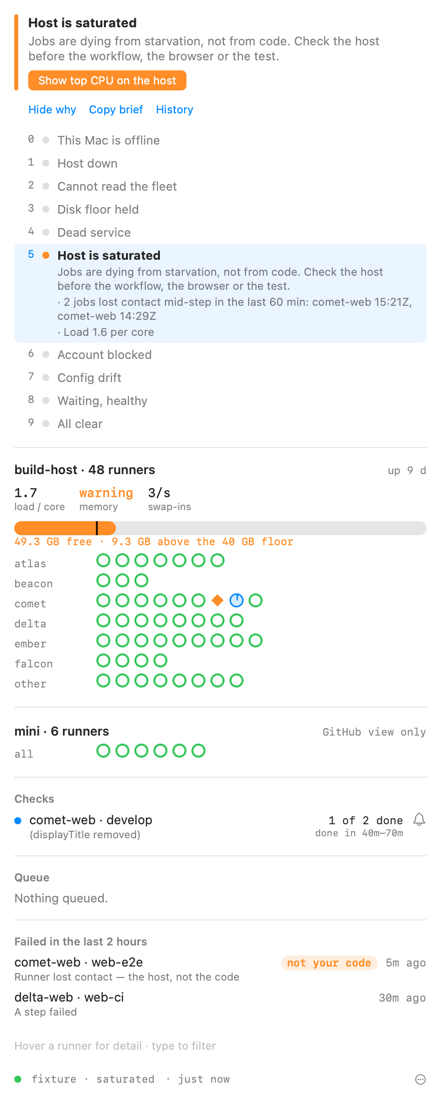
Why? under the verdict opens the whole ladder with the verdict's rung lit, the evidence under it, and every other rung that is currently true. It is the answer to "is it really this, and not something above it?"
Copy brief
Copy brief puts a markdown incident brief on the clipboard: the verdict, its
evidence and next move, everything else open, host vitals, any runner that is
neither idle nor busy, the queue and open alerts. It is written to paste into an
agent session or an issue. cockpit brief prints the same thing.
History
History under the verdict opens a timeline of the last 24 hours or 7 days, one lane per failure mode, with:
- today's line: how long jobs waited against how long they ran, how long admission held them, how many the host lost;
- the week: incidents, time to clear, the repos that waited longest;
- any runner that keeps losing jobs.
Under the coordinator's lane, sparklines show two hours of load per core, swap-ins and free disk with the floor drawn in, and the disk gauge says when the floor will be reached at the current rate — the nearer of a 6-hour and a 72-hour linear fit, and nothing when the line is flat or rising.
Every Monday from 09:00 a digest notification sums up the previous week, once.
Standing risks
The orange standing risks link lists conditions that are fine today and have caused an outage before:
| Risk | Why it matters |
|---|---|
| Spotlight indexing the fleet root | Indexing tens of thousands of work-tree files starves the host until runners lose jobs mid-step |
| No auto-login | Runners are LaunchAgents; after a reboot with nobody logged in, every one is stranded |
| System sleep | A sleeping host takes every runner with it |
| Admission hooks missing on a runner | That runner ignores the disk floor and the slot limit |
| Runner version drift | Runners on different versions behave differently and GitHub retires old ones |
| No periodic health-repair agent | A dead runner service stays dead until someone looks |
| Workflows still on GitHub-hosted macOS | Each is a billing block waiting to happen |
Checkout behind origin/main |
The host is running code that has since been fixed |
| GitHub API headroom | A drained rate limit blinds the collector |
Each says what to do and who can do it: a command, a button, or the owner — several are system settings only a person at the host can change, and on an employer-managed Mac some may be locked by MDM. A probe that could not answer (Spotlight's own query can take a minute over a large tree) is shown as unchecked, never dropped: an unknown is not a fix.
Looking closer at the host
- What is using disk? (shown when disk is a worry) runs the cleanup preview. It deletes nothing.
- Top CPU on the host (shown when the host is busy) lists the top processes
over SSH and names Spotlight outright when it is the culprit.
cockpit topdoes the same.
A runner's panel
Click a pill for the runner's recent jobs and state changes and its last
_diag error, with these buttons:
| Button | Shown | Does |
|---|---|---|
| Repair | The runner is dead or offline | fleet.healthRepair |
| Restart | Always | runner.restart for this runner |
| Drain / Resume | Drain unless it is draining | runner.drain / runner.resume |
| Open job | It has a running job | Opens the job on GitHub |
| Diagnostics | Always | Saves the runner's redacted diagnostic bundle to Downloads |
The actions need pairing; without it they say so.
Acting on it
Once paired, buttons come from the dashboard's own
action catalogue (GET /api/actions), with its labels and its confirmation
text. The cockpit accepts only a fixed subset of that catalogue, whatever the
dashboard offers:
| Action | In the app | From cockpit run |
|---|---|---|
fleet.healthRepair — Health check and repair |
The dead-service next move, a runner's Repair, the notification Repair button, the Repair Fleet shortcut | with --yes |
fleet.cleanupPreview, then fleet.cleanupApply |
The disk-floor next move and What is using disk?; Apply cleanup appears only after a preview and is confirmed inline | preview: yes; apply: with --yes |
runner.restart, runner.drain, runner.resume |
A runner's panel | with --name and --yes |
fleet.health, fleet.status |
— | yes (reads) |
host.off, host.on — Switch host off/on |
— | with --yes; --host <id> for another host |
host.drain, host.resume, run.rerun, run.cancel |
— | with --yes |
fleet.cleanupApply is the only high-danger action the cockpit accepts, and in
the app only as the second step after a preview.
Registering, duplicating and removing runners are left to the web dashboard's Control tab, which previews them.
The footer menu
| Item | Does |
|---|---|
| Open web dashboard | Opens the dashboard in your browser through the current route |
| Terminal on the host | Opens Terminal with ssh to the first alias |
| Reconnect now | Skips the pending backoff and reconnects |
| Open as a floating window ⌃⌥⌘F | The popover as a window above the others, for a second display |
| Incident replay… | Steps through the recorded incidents; see Around macOS |
| Settings… | See Settings and files |
Notifications
Alerts from the dashboard notify on transitions, the same ones the dashboard itself fires: once when a condition opens, once when it clears with how long it lasted.
- Conditions already open when the app starts are not re-announced.
- More than five opening at once (a host restart) arrive as one summary.
- Critical alerts are time-sensitive and break through Focus.
- Conditions only this Mac can see — host down, dashboard down, this Mac offline — notify the same way, and "Fleet reachable again" says how long they lasted.
Notifications carry buttons:
| Button | On | Does |
|---|---|---|
| Repair | Dead or offline runners | Runs fleet.healthRepair (needs pairing) |
| Dismiss everywhere | Alerts | Dismisses on the dashboard: the web page and phone push stop too |
| Snooze 1 hour | Alerts | This Mac only |
| Open dashboard | Alerts | Opens the web dashboard's Alerts tab |
In Settings you can notify for critical only, set quiet hours during which
only critical alerts notify, and mute rules by name (for example
stuck-queue, runner-unused). A Focus filter can narrow
them further while a Focus is on.