Federation (Multiple Macs)
Federation lets the dashboard coordinate runners across several Macs. Each
extra Mac runs a lightweight agent (agent.js) that reports outbound to the
coordinator — no inbound port is needed on agent hosts.
Current topology (2026-10-21)
One Mac, ultra, is both the coordinator (fleetd, replica id ultra) and
the only runner host, with FLEET_TIERS_MODE=off. The previous runner host
was retired after moving the coordinator.
Fleet Cockpit reaches the dashboard through the ssh aliases ultra, then
ultra-ts; a different or extra coordinator is a setting there, not a new
build. To add a runner host, follow
Adding a second runner host.
Architecture
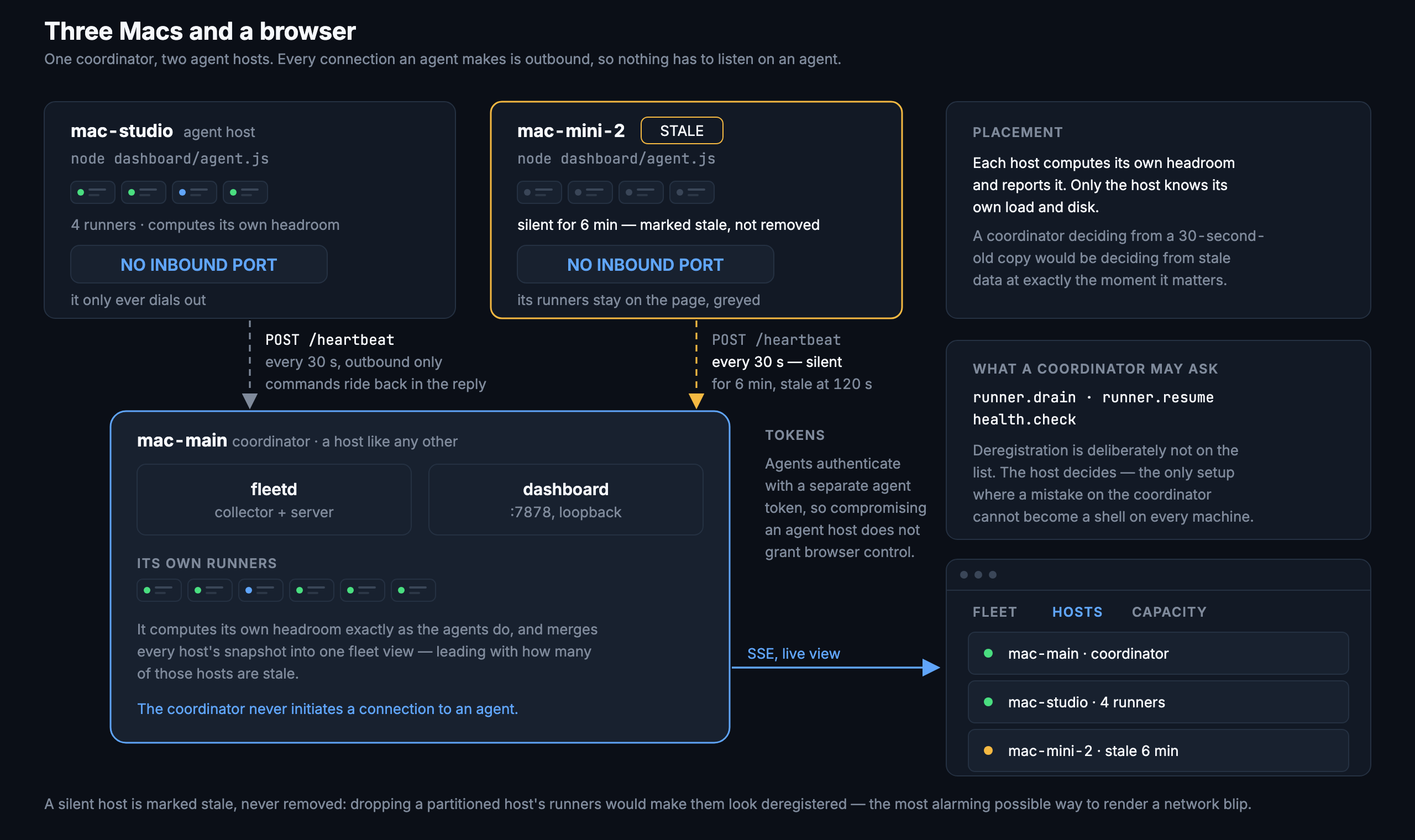
The coordinator is the single SQLite writer and placement authority. Agents report outbound-only; the coordinator pushes commands back in the heartbeat response. Agents never listen for connections.
GitHub remains the job scheduler. The fleet coordinates where matching
runner capacity is created based on availability and capabilities. Individual
jobs are dispatched by GitHub's own runs-on: matching — the fleet does not
intercept or queue them.
Rollout stages
Start conservatively and expand permissions as trust builds:
| Stage | FLEET_AGENT_ALLOW_COMMANDS | FLEET_AGENT_ALLOW_REGISTER | Effect |
|---|---|---|---|
| 1. Reporting only | 0 | 0 | Agent sends heartbeats, appears in Hosts tab |
| 2. Drain/resume | 1 | 0 | Coordinator can drain or resume runners remotely |
| 3. Remote provisioning | 1 | 1 | Coordinator can register new runners via autoscaling |
Remote deregistration is a fourth, separately destructive opt-in:
FLEET_AGENT_ALLOW_DEREGISTER=1.
Stage 2 grants every non-destructive action, including runner restarts and
health repair. FLEET_AGENT_COMMANDS narrows it to a list:
runner.drain,runner.resume,tiers.drain,tiers.resume is drain and resume only,
which is all standby tiers need.
Quick start
1. Coordinator: open the bind address
By default the coordinator binds to loopback. To accept agent heartbeats, add
to fleet.env:
Then restart the coordinator:
2. Coordinator: generate an agent token
cd ~/actions-runners/dashboard
./fleetctl.sh agent-token --host mac-studio-1
# Copy the token it prints to that host's fleet.env.
3. Agent Mac: clone and configure
git clone https://github.com/your-org/actions-runners.git ~/actions-runners
cd ~/actions-runners
cp examples/fleet.env.federated-agent fleet.env
# Edit fleet.env — set coordinator(s), token, stable host ID, and display name
# Minimum required in fleet.env:
FLEET_COORDINATOR=http://coordinator-mac:7878
FLEET_AGENT_TOKEN=<token from step 2>
FLEET_HOST_ID=mac-studio-1
FLEET_HOST_NAME=mac-studio-1
FLEET_HOST_ID is the stable command-routing and token-scope key. It must match
the value passed to agent-token --host and should not change when you rename
the display-only FLEET_HOST_NAME.
4. Agent Mac: install and start
The agent appears in the Hosts tab within one heartbeat interval (default 30 s).
5. (Optional) Enable remote commands
To allow the coordinator to drain/resume runners on the agent:
To also allow the coordinator to provision new runners via autoscaling:
# In fleet.env on the agent:
FLEET_AGENT_ALLOW_COMMANDS=1
FLEET_AGENT_ALLOW_REGISTER=1
./dashboard/agentctl.sh restart
Adding a second runner host
A second Mac shares the load when it has runners for the same repos with the same labels: GitHub then hands each job to whichever host has an idle match, and each host's admission hook limits how many run there at once. One command sets that up from a clone:
git clone https://github.com/your-org/actions-runners.git ~/actions-runners
cd ~/actions-runners && cp examples/fleet.env.second-host fleet.env   # edit the marked lines
scripts/join-host.sh            # dry run: preflight, then what it would register
scripts/join-host.sh --apply --only one-low-risk-repo                # pilot
scripts/join-host.sh --apply    # the rest
On the coordinator first: ./dashboard/fleetctl.sh agent-token --host <id>
for the token file, and the name or IP the new host uses for the coordinator in
FLEET_ALLOWED_HOSTS (then ./dashboard/fleetctl.sh install, which rewrites the
plist). Raise maxTotalRunners on the Capacity tab if the fleet is at it.
Copying is by label set, not by repo: a repo whose runners are labelled ci
and ui-web gets one of each. A set that needs a label this host does not
advertise is skipped and named, as are Simulator runners when xcodebuild does
not run here and repos in FLEET_MIRROR_SKIP_REPOS. Advertise a label only once
it is safe for CI to use here: postgres lets jobs create and drop databases on
this host's server.
Because the new host has no fleetd, point its admission hook's cancellation
check at the coordinator with FLEET_ADMIT_STATUS_URL (the template does).
Admission across hosts
Each host's job hooks limit how many jobs run on that host and log every
decision to its own dashboard/logs/admission.ndjson. The coordinator reads its
own file; an agent ships the lines added since its last accepted heartbeat, and
the coordinator stores them with that host's id (admission_events.host_id).
The Capacity tab's headline mode and limit are the coordinator's;
admission.byHost on /api/state has each host's. Delivery is at-least-once:
the agent's read offset (dashboard/.fleet-agent-admission-offset) moves only
by the lines the coordinator acknowledged.
An agent starting for the first time begins at the end of its log. To continue an existing history instead (a host that was the coordinator), seed the offset file before starting the agent; see below.
Moving the coordinator to another Mac
The coordinator is the one fleetd that polls GitHub and owns fleet.db. To hand
that role to another Mac without losing history or re-pairing clients:
- New host: a clone on
main,gh auth logindone in its desktop session (fleetd resolves its GitHub token withgh auth tokenunder launchd), and the same commit as the old coordinator. - Old host, idle (no
Runner.Worker):./dashboard/fleetctl.sh backup, then stop fleetd (./dashboard/fleetctl.sh uninstall). - Copy from the old
dashboard/to the new one: the backup asfleet.db,.fleet-token,.fleet-device-tokens.json,.fleet-agent-tokens.json,alerts.config.json. Device tokens carry over, so paired apps and CLIs only need the new URL. - New host: stop its agent if it ran one (
./dashboard/agentctl.sh
   uninstall
; a coordinator reports itself), setFLEET_HOST,FLEET_PORT,FLEET_REPLICA_IDandFLEET_ALLOWED_HOSTSinfleet.env, then./install.sh coordinator. - Old host becomes an agent: mint its token on the new coordinator
(
./dashboard/fleetctl.sh agent-token --host <old id>, keeping the id it had asFLEET_REPLICA_ID), seed its admission offset from the database it handed over —sqlite3 fleet.db "SELECT value FROM meta WHERE key='admission_log_offset'" > dashboard/.fleet-agent-admission-offset— pointFLEET_ADMIT_STATUS_URLat the new coordinator, and./install.sh agent. - Clients: every dashboard URL (browser, menu bar app, CLI, monitors) moves to the new host.
admission_events.host_id and host_samples.host_id keep each machine's
history apart across the move.
Capability labels
Labels declared in FLEET_HOST_LABELS are used by the placement engine to
route scale-up decisions to hosts that can serve the job. A host without a
required label is skipped with a visible reason.
# In fleet.env on the coordinator or agent:
FLEET_HOST_LABELS=xcode-16,macos-15

# In the runner registration:
./register.sh owner/ios-app xcode-16
A queued workflow that needs xcode-16 will be placed on a host that declares
it. A host without the label gets a missing required labels refusal in the
placement_decisions table.
Placement decisions
Every autoscale event is audited. The coordinator records the chosen host, the reason, and every considered-but-refused host. The Hosts tab surfaces recent decisions and their outcomes.
To query the audit log directly:
sqlite3 dashboard/fleet.db \
  "SELECT ts, repo, host_id, reason, dry_run FROM placement_decisions ORDER BY ts DESC LIMIT 10"
To query pending and in-flight commands:
sqlite3 dashboard/fleet.db \
  "SELECT host_id, action, status, ts FROM host_commands ORDER BY ts DESC LIMIT 20"
Capacity limits per host
Each host computes headroom locally — the agent knows its own load, disk, and
runner count at the moment it matters. Configure the gates in fleet.env on
each host:
FLEET_MAX_TOTAL_RUNNERS=8    # cap on runners this host may hold
FLEET_CEILING=3              # do not add while this many jobs are running
FLEET_LOAD_PER_CORE=2        # do not add above this load/core ratio
FLEET_MIN_FREE_DISK_GB=50    # do not add below this free disk threshold
Taking a host out of rotation
There are two levels, and both are reversible:
| Existing runners | New runners | How | |
|---|---|---|---|
| Switch off | Stop taking jobs; a busy one finishes its job first, then stops | None placed here | The switch beside the host's name (Fleet and Hosts tabs), or scripts/host-drain.sh --off |
| Pause new runners | Keep taking jobs | None placed here | Pause new runners on the host's card, or scripts/host-drain.sh --drain |
Switching off drains every runner on the host with owner host. Nothing is
deregistered, so GitHub still lists them (offline), and switching back on
(--on) resumes exactly those runners — a runner you drained yourself stays
drained. Before it asks, the switch names the jobs that will finish first and
any repo that no other host serves, whose jobs would queue until the host is
back on.
# On any host (coordinator or agent):
scripts/host-drain.sh --off      # stop taking CI jobs; busy runners finish first
scripts/host-drain.sh --on       # take CI jobs again
scripts/host-drain.sh --drain    # pause new runners only
scripts/host-drain.sh --resume   # allow new runners again
scripts/host-drain.sh --status   # on, paused, or off — and runners still finishing
The host marker is ~/actions-runners/.drain: first line drained (paused)
or off. The agent reports it on its next heartbeat. While a host is off the
standby tiers controller treats it as unusable (an off primary wakes the
standby; an off standby is never woken), autoscale places nothing there, the
agent refuses runner.register, and agent autonomy resumes nothing.
A drained runner's LaunchAgent still starts it at login or after a reboot.
fleetd and the agent stop it again within a heartbeat ("drain held" in the
log), unless FLEET_HOLD_DRAINS=0.
Token rotation
Agent token:
# On the coordinator:
cd ~/actions-runners/dashboard
./fleetctl.sh agent-token --host mac-studio-1
# Running it again rotates only that host.
FLEET_AGENT_TOKEN in fleet.env and run
./dashboard/agentctl.sh install so the mode-0600 local token file is replaced.
Control (browser) token:
The two tokens are independent so either can be rotated without invalidating the other.
Failure recovery
Coordinator restarts do not affect existing runners. They take jobs directly from GitHub and do not need the coordinator to be running.
Network loss between coordinator and agents leaves agents in their last
known state. They keep accepting jobs normally. The coordinator marks their
heartbeats stale after STALE_HEARTBEAT_MS (default 2 min) and excludes
them from placement.
Command delivery failure: if an agent processes a command but crashes
before posting the result, the coordinator marks the command sent. After
5 minutes with no acknowledgement, the command is reset to pending and
re-sent on the agent's next heartbeat. Delivery stops after three attempts and
the command is marked failed. Delivery is at-least-once, but the agent keeps an
atomic mode-0600 journal of the last 256 command results and replays a prior
result instead of executing the same command key twice.
Retries never create duplicates: the result journal covers every command;
runner.register also checks whether the runner directory already exists. The
coordinator's idempotency key prevents the same command from being queued twice
in rapid succession.
Security
- Never expose the coordinator port to the public internet. Use a VPN or SSH tunnel for remote access.
- LAN-only deployment: set
FLEET_HOST=0.0.0.0and rely on your network perimeter. - SSH tunnel: leave
FLEET_HOST=127.0.0.1and tunnel on agent hosts: - Token files are stored with mode 0600. Never embed tokens in plist
ProgramArguments— they appear inpsoutput. - The agent token is narrower than the control token: it grants heartbeat delivery and command acknowledgement only, not the control-plane actions available in the browser. Separate them so a compromised agent does not grant browser-level access.
Automatic coordinator failover
For two Macs that should both run CI and either should be able to host the
dashboard, run fleetd on both with the same managed PostgreSQL database and a
different FLEET_REPLICA_ID.
- Both Macs remain active GitHub runner hosts.
- Both serve the dashboard and shared fleet snapshot.
- PostgreSQL advisory locking allows exactly one fleetd to poll GitHub, autoscale, backfill, and reconcile alerts.
- The standby reports its local health, executes commands addressed to it, and promotes when the leader's PostgreSQL session disappears.
- Additional agents may set
FLEET_COORDINATORS=http://mac-a:7878,http://mac-b:7878for endpoint failover.
This is not two independent coordinators. Independent SQLite writers would
duplicate polling and commands and split historical state. See
Configuration for cutover.
Do not run agent.js on either Mac that is already an HA fleetd replica;
fleetd performs that host-reporting and command-execution role itself.
Troubleshooting
Agent appears offline in the Hosts tab:
- Check that the coordinator's FLEET_HOST is not loopback (set
FLEET_HOST=0.0.0.0)
- Confirm the agent can reach the coordinator:
curl http://coordinator-mac:7878/api/health
- Check FLEET_AGENT_TOKEN matches on both ends:
dashboard/agentctl.sh status on the agent shows whether it is reachable
Commands not reaching the agent:
- Confirm FLEET_AGENT_ALLOW_COMMANDS=1 is set and the agent was restarted
- Check agent logs: dashboard/agentctl.sh logs
Remote provisioning not working:
- Confirm FLEET_AGENT_ALLOW_REGISTER=1 AND FLEET_AGENT_ALLOW_COMMANDS=1
- Confirm register.sh exists on the agent host (it should — it is in the repo)
- Check that the coordinator can reach the GitHub API (for registration tokens)
Placement always choosing the coordinator host:
- Confirm remote agents are connected: check the Hosts tab for heartbeat age
- Verify agent hosts declare capacity (FLEET_MAX_TOTAL_RUNNERS, FLEET_CEILING)
- Check placement_decisions for refusal reasons
Runner registered on agent but not visible on coordinator:
- The runner name appears in GitHub's runner list; the coordinator sees it in
the elsewhere array. It is attributed to the agent host once the agent's
next heartbeat includes it in its runners list.